
New Texas LTC Application Process: What Changed and What to Do Now
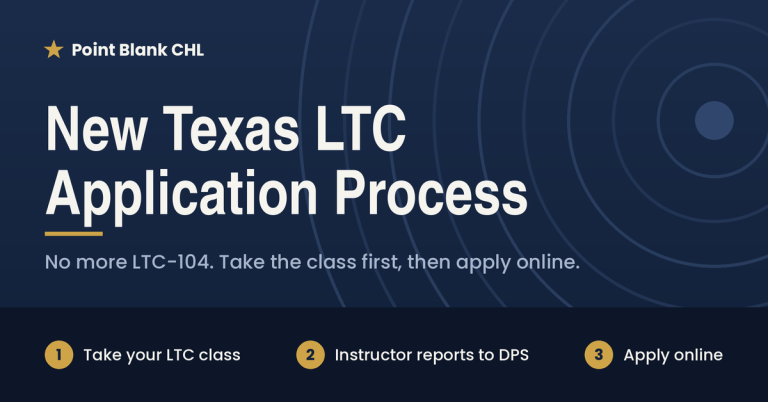
If you’re planning to get your Texas License to Carry, there’s important news. The Texas LTC application process has changed, and the order of steps is now different. You now take the class first and apply second. Instructors also no longer hand out paper certificates. Here’s what that means for you and how to get your LTC without any hiccups.
What Changed in the Texas LTC Application Process?
There are four big changes every new applicant should know about. Each one affects how and when you apply.
1. No More LTC-104 Certificates of Training
For years, Texas LTC instructors gave each student a signed LTC-104 Certificate of Training after the class. Students then uploaded or mailed that certificate to DPS as proof they passed. That paper certificate is now gone. Texas LTC instructors will no longer issue the LTC-104.
2. You Can No Longer Apply Before Taking the Class
Previously, many students submitted their online LTC application first and then took the class later. That option is no longer available. Under the new process, you must complete your License to Carry class before you submit your online application to the Texas Department of Public Safety (DPS).
3. Instructors Now Report Your Training Directly to DPS
Instead of a paper certificate, your instructor now logs your course information straight into the DPS system. They do this through a new instructor dashboard on the DPS website. As a result, DPS knows you passed the class as soon as your instructor records it. There’s no document for you to keep track of, upload, or lose.
4. You’ll Apply Through a New Portal Called RSD Connect
Students now need a Texas by Texas (TxT) account to login to RSD Connect. If you already have one from another Texas state service, you can use it. There’s no need to create a new one. TxT is the official online account system from the State of Texas, and it’s how you’ll apply for your License to Carry on the new DPS website called RSD Connect. After you apply, you can log back in to your RSD Connect account any time to update your personal information. You’ll also use the same account to renew your license down the road. So once it’s set up, keep your login somewhere safe.
How the New Texas LTC Process Works, Step by Step
The new order is simple. Follow these steps, and you’ll be on your way to your license.
- Sign up for a Texas LTC class. Choose a DPS-certified instructor and book your course.
- Complete the classroom and range portions. Pass the written exam and the shooting proficiency test.
- Your instructor logs your results with DPS. After you pass, your instructor enters your course information in the DPS instructor dashboard.
- Create your RSD Connect account. It will guide you to create a TXT account if you don’t already have one.
- Submit your online LTC application. Once your training is on file, apply online through your new RSD Connect account.
- Finish the remaining DPS steps. Pay your fee, schedule your fingerprints, and wait for DPS to process your application.
Why Did Texas DPS Change the LTC Process?
Moving training records online makes the whole process cleaner. Paper certificates could be lost, filled out wrong, or uploaded incorrectly, which caused delays. Now DPS receives your training record directly from a certified instructor. In other words, there’s less paperwork for you and fewer chances for mistakes that slow down your license.
Tips for a Smooth Texas LTC Application
A few simple habits will help you avoid delays with the new system.
- Use your legal name. Register for class using the exact name on your Texas ID. That way, your training record matches your application.
- Bring accurate personal details. Your instructor needs correct information to log your course with DPS.
- Save your TxT login. You’ll need it again to update your information or renew your license.
Frequently Asked Questions
Will I get a certificate after my LTC class?
No. Instructors no longer issue the LTC-104 Certificate of Training. Instead, your instructor reports your completion directly to DPS.
Can I start my online application before class?
No. Under the new Texas LTC application process, you must complete the class first. After that, you can submit your online application.
How does DPS know I passed the class?
Your instructor logs your course information in the new DPS instructor dashboard. That record tells DPS you successfully completed your training.
Do I need a TxT account to apply for my LTC?
Yes. You’ll use a Texas by Texas (TxT) account to submit your License to Carry application on the new DPS website. If you already have a TxT account, you can use your existing one. Otherwise, you’ll create a new account.
How do I update my information or renew my license?
Log in to your TxT account. From there, you can change any information that needs updating, and you’ll use the same account when it’s time to renew your license.
Ready to Get Your Texas License to Carry?
The new process is actually easier for students. Take your class, let your instructor handle the reporting, and then apply online at RSD Connect. At Point Blank CHL, we’ll walk you through every step and make the new process easy for you. Sign up for our online LTC class to get started.